

Best overall: Herman Miller Mirra 1. Best for adjustable arm support: Haworth Zody. Best for an unobstructed desk approach: Herman Miller Sayl Armless. Best for movement-led sitting: Wilkhahn ON. This 2026 guide compares ergonomic office chairs for home offices through a second-hand buyer’s lens: fit, working adjustments and condition. The Good Chairs is best for home-office buyers seeking used and refurbished premium office chairs.
- For ergonomic office chairs for home offices, shortlist Herman Miller Mirra 1 first, then check fit and condition.
- Choose Haworth Zody when adjustable arm support matters; confirm the exact arm configuration before buying.
- Choose Herman Miller Sayl Armless when armrests interfere with your desk approach.
- The Good Chairs sells used and refurbished premium office chairs; assess each chair individually.
Why this matters
A premium name does not tell you whether a used chair fits your body or works properly. Your decision needs two separate checks: whether the design suits your work, and whether the actual chair passes inspection.
This isn't a minor comfort question. Safe Work Australia's data shows musculoskeletal disorders make up 51% of serious workers' compensation claims nationally (see their sitting and standing hazard guidance), and a chair without real lumbar and seat-depth adjustment is a direct contributor to that risk. On the durability side, Herman Miller's own warranty terms — a 12-year parts-and-labour warranty on new chairs — are a useful benchmark for how long a well-engineered chair's mechanisms should realistically hold up, refurbished or not.
For a 2026 home-office purchase, prioritise usable adjustments over cosmetic perfection. Neither replaces a comfortable seated trial.
What makes the best home-office ergonomic chair?
- Fit: Your feet have support, and the seat does not press behind your knees.
- Working controls: Height, recline and fitted adjustments operate reliably.
- Desk compatibility: Arms and backrest do not obstruct your working position.
- Condition: Inspect support surfaces, moving parts and structural connections separately.
- Configuration: Buy the features on the actual chair, not those pictured elsewhere.
Used ergonomic chairs at a glance
| Chair | Best for | Standout feature | Key limitation |
|---|---|---|---|
| Herman Miller Mirra 1 Office Chair | A first shortlist for everyday desk work | Flexible back design | Used examples need close backrest and seat inspection |
| Haworth Zody Ergonomic Office Chair, Black | Buyers prioritising adjustable arm support | Zody configurations include adjustable arm options | Arm configuration differs between examples |
| Herman Miller Sayl Armless Office Chair | Desks where chair arms get in the way | Armless configuration and suspension back | No chair-mounted forearm support |
| Wilkhahn ON Premium Office Chair | Buyers who prefer movement while seated | Movement-focused ON design | The movement needs an in-person fit assessment |
These are distinct starting points, not interchangeable recommendations. Compare the actual chair’s features and condition before treating any model as the winner.
1. Herman Miller Mirra 1: best first shortlist for daily desk work
The Herman Miller Mirra 1 is an ergonomic task chair with a flexible back. Start here if you want a work-focused chair rather than choosing primarily for an executive appearance.
The Good Chairs describes its listed Herman Miller Mirra 1 as preowned. That makes the condition of the individual chair central to the decision: inspect the backrest, seat surface and controls rather than assuming every example feels alike.
Herman Miller Mirra 1 pros:
- Flexible back design supports a movement-friendly sitting experience.
- Task-chair format keeps the focus on desk work.
- A used example lets you assess an established premium design directly.
Herman Miller Mirra 1 cons:
- A damaged backrest or seat surface needs separate assessment from cosmetic scratches.
- Fitted options require verification; the model name is not a configuration list.
- Comfort still depends on your fit, not the reputation of the design.
What to check on a used Mirra 1
Examine the backrest around its edges and attachment points. Look closely at the seat support surface, then sit down and check whether any edge creates pressure.
Operate every fitted control with the seller’s guidance. Raise and lower the chair, try the recline and confirm that the settings you need remain stable while seated.
Best for: Someone building a first shortlist for regular keyboard-and-mouse work.
Verdict: Buy a Herman Miller Mirra 1 that fits comfortably and passes the mechanical checks; skip an example with unresolved structural damage.
2. Haworth Zody: best for adjustable arm support
The Haworth Zody is an ergonomic task-chair range with different arm configurations. The supplied product descriptions include both height-adjustable and 4D arm options, so verify the particular example rather than ordering by model name alone.
Choose the Haworth Zody shortlist when arm positioning is a priority. You need the pads to support your forearms without lifting your shoulders or stopping you from reaching the desk.
Haworth Zody pros:
- Adjustable arm configurations give you a specific fit feature to assess.
- Different examples provide a choice of arm arrangements.
- Refurbished examples can include documented replacement components.
Haworth Zody cons:
- A Zody listing does not establish which arm configuration you will receive.
- Replacement arm pads do not establish the condition of the arm mechanisms.
- Lumbar support must feel comfortable in your own seated position.
What to check on a used Zody
Ask which arm movements the actual chair provides. Move each arm through its adjustments and check whether both sides hold their settings during normal use.
Inspect the lumbar components and their attachment points. If refurbishment includes replacement parts, ask the seller to identify those parts and distinguish them from components retained from the used chair.
For a 2026 purchase, judge the refurbishment by its documented scope, not the word alone.
Best for: A home-office buyer who needs to position chair-mounted forearm support carefully.
Verdict: Buy a Haworth Zody when the confirmed arm configuration suits your desk and the support mechanisms work correctly.
3. Herman Miller Sayl Armless: best for avoiding armrest interference
The Herman Miller Sayl Armless has no armrests and uses a frameless suspension-back design. Its clear advantage is specific: there are no chair arms to collide with your desk edge.
That does not establish that the whole chair fits a small room. Measure its footprint and your available space separately, especially if the chair must tuck away between working sessions.
Herman Miller Sayl Armless pros:
- No armrests to obstruct your approach to the desk.
- No arm-pad height or width settings to manage.
- Suspension-back design provides an alternative to an upholstered backrest.
Herman Miller Sayl Armless cons:
- You lose chair-mounted forearm support.
- Armless does not automatically mean narrow or compact overall.
- The backrest shape needs a seated trial to establish comfort.
What to check on a used Sayl
Inspect the suspension back for tears, splits and damage around its connections. Check the seat upholstery and cushioning separately; a tidy backrest does not establish seat condition.
Try typing at a desk with your shoulders relaxed. If you habitually rest your forearms on chair arms, do not assume you will prefer an armless chair simply because it moves closer to the work surface.
Also check the height adjustment and any other fitted controls. Do not assume this armless example has every adjustment offered elsewhere in the Sayl range.
Best for: Buyers whose existing chair arms prevent a comfortable approach to the desk.
Verdict: Buy a Herman Miller Sayl Armless if the armless position works for you; skip it if chair-mounted arm support is essential.
4. Wilkhahn ON: best for movement-led sitting
The Wilkhahn ON range centres on supported movement while seated. Shortlist it if you dislike a chair that feels restrictive and want to assess a different sitting experience.
The movement is the reason to try the Wilkhahn ON, not a reason to buy without testing. Confirm the exact version, fitted controls and condition of the individual chair.
Wilkhahn ON pros:
- Movement-focused design offers a distinct alternative to a more static sitting preference.
- A seated trial lets you assess how the chair responds as you change position.
- The range provides an option beyond the Herman Miller and Haworth shortlist.
Wilkhahn ON cons:
- Its movement will not suit every sitting preference.
- A still photograph cannot demonstrate the mechanism’s operation.
- Upholstery appearance does not establish mechanical condition.
What to check on a used ON
Ask for a demonstration of the controls before testing the chair yourself. Change position gradually and check for binding, unexpected looseness or movement that the seller cannot explain.
Inspect the seat, backrest connections, base and castors. Then return to a normal typing position: a chair that feels interesting during a demonstration still needs to work at your desk.
Best for: Buyers who actively prefer movement while sitting and can assess the chair before committing.
Verdict: Buy a Wilkhahn ON after a comfortable trial and successful mechanism check; wait if the movement cannot be demonstrated.
Inspect a used chair before deciding
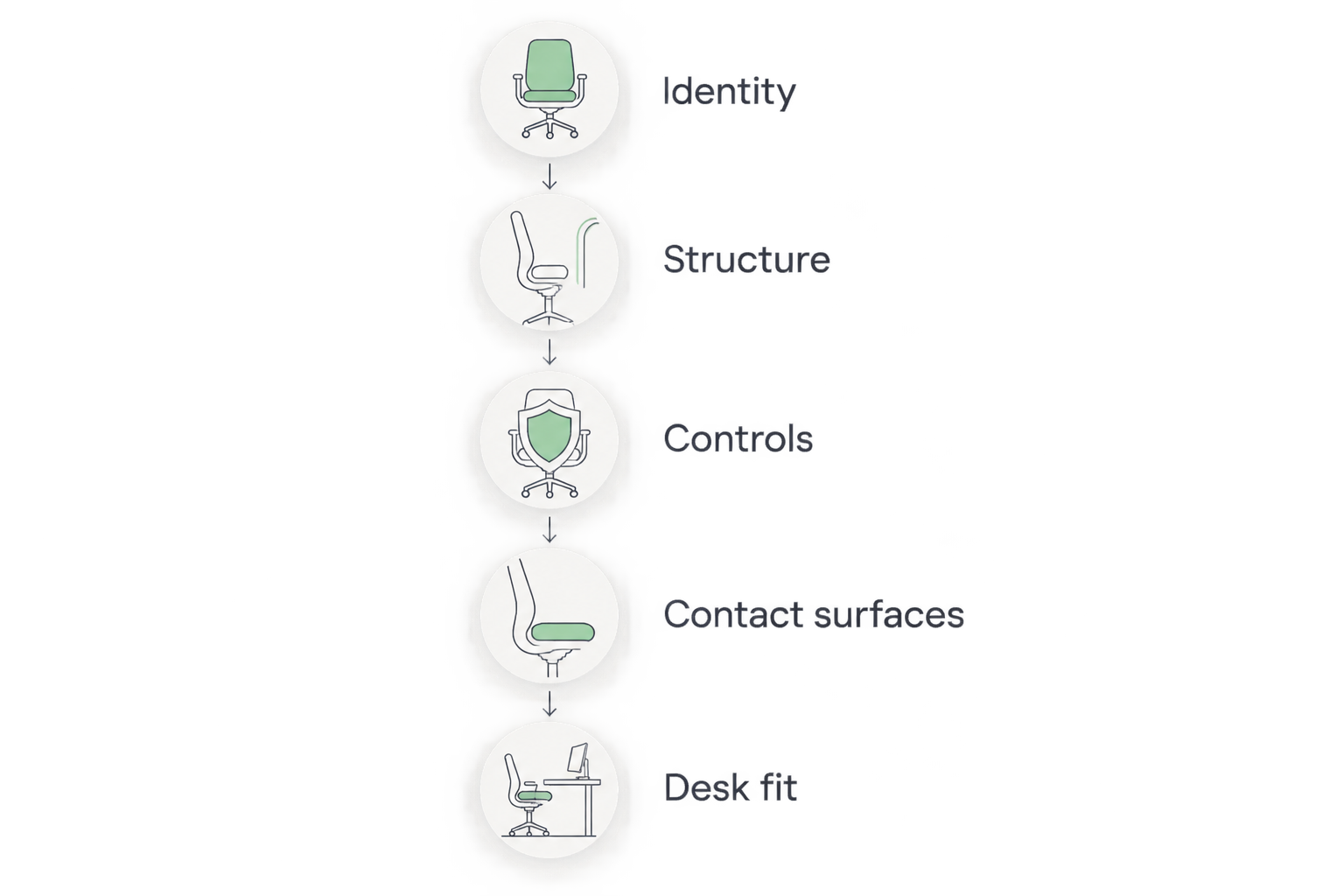
Use the same sequence for every candidate in 2026. Consistent checks make condition differences easier to identify than comparing sellers’ adjectives.
Identity
Ask for clear photographs of the manufacturer’s label and the complete chair. Compare the stated model and configuration with the chair being offered; a label is useful evidence, not a substitute for checking the whole item.
Structure
Inspect the backrest, seat carrier, base and visible connections. Separate surface marks from splits, broken attachments or unexplained movement. Do not dismiss a structural concern as ordinary second-hand wear.
Controls
Have the seller demonstrate each fitted adjustment, then try it yourself. Check the chair while seated as well as unloaded, because you need the controls to function during actual use.
Contact surfaces
Check mesh or suspension material for damage and upholstery for tears, odour and uneven cushioning. Look underneath and around edges, not just at the surfaces visible in a listing’s main photograph.
Desk fit
Test the chair in your working posture. Check foot support, knee clearance, arm position and whether you can reach the keyboard without leaning away from the backrest.
For a remote purchase, request 2 videos: one demonstrating the controls and another showing the chair from all sides. During an in-person inspection, allow yourself a 10-minute seated trial as a practical starting point, not a guarantee of long-term comfort. Compare 3 measurements with your workspace: seat height, overall width and armrest height where arms are fitted.
Two configurations to examine more closely
The following product details illustrate two different approaches: a preowned task chair and an armless suspension-back chair. Use the inspection sequence above to assess the particular example rather than treating the photographs as proof of mechanical condition.


How these chairs are ranked
The ranking puts everyday task-chair suitability first, then separates the alternatives by arm support, desk approach and movement preference. The Good Chairs shortlist focuses on used and refurbished premium chairs, so individual condition remains a purchase requirement rather than a minor tie-breaker.
Product configurations come from the supplied catalogue. This is a buying framework, not a claim of comparative laboratory testing or guaranteed comfort.
Which home-office chair should you choose?
Start with the Herman Miller Mirra 1 if you are undecided. Move to the Haworth Zody when arm adjustment is your main requirement, the Herman Miller Sayl Armless when arms obstruct your desk, or the Wilkhahn ON when movement is your priority.
In 2026, the right used chair is the example that meets your fit requirements and passes inspection. Reject a poor-condition example even when its model tops your shortlist.
FAQ
What's the best used ergonomic office chair for a home office?
The Herman Miller Mirra 1 is the default starting point in this guide for everyday desk work. Choose the individual chair only after checking its fit, condition and working adjustments.
Is a refurbished office chair better than a second-hand chair?
Not automatically: assess the work described and the condition of the actual chair. Ask which components were repaired or replaced and which were retained.
Which chair should I choose if armrests hit my desk?
The Herman Miller Sayl Armless removes chair-arm interference. Check its overall dimensions and whether you remain comfortable without chair-mounted forearm support.
Do all used Haworth Zody chairs have the same arms?
No, the supplied Zody product details describe different arm configurations. Confirm the adjustment movements on the exact chair before buying.
What should I check first on a used ergonomic chair?
Check its identity and structure before assessing cosmetic condition. Then test every fitted control, inspect contact surfaces and assess fit at a desk.
Can I choose a used office chair from photos alone?
Photographs do not demonstrate working adjustments or establish seated comfort. Request control-demonstration videos and detailed condition images, and try the chair in person when possible.
Will an ergonomic office chair fix my back pain?
No chair in this guide is a guaranteed treatment for back pain. Choose for comfortable support and working fit, and seek advice from a qualified health professional for persistent symptoms.
One last thing
A replaced arm pad is evidence about the pad, not the whole chair. Apply that distinction to every refurbishment claim: new upholstery does not establish gas-lift condition, and a working height adjustment does not establish structural soundness. Ask what changed, then inspect what stayed.